
The Context
Our team was working on an enterprise web application built using Blazor Server. The application consists of multiple interconnected modules supporting different business processes, with many users potentially working in the system at the same time.
As the application grew, we wanted to understand how it would behave under increased load. Our goal was not only to measure response times, but to observe how the complete application behaved when dozens of users were actively interacting with it simultaneously.
What initially sounded like a standard performance-testing task quickly became more complex because Blazor Server does not behave like a traditional request-response web application.
Why Blazor Server Was Different
In a traditional web application, most user actions generate HTTP requests. Performance tools such as Apache JMeter can reproduce those requests with hundreds or thousands of virtual users and measure how the backend responds.
Blazor Server uses a different communication model.
After the initial page load, the browser establishes a persistent SignalR connection with the server, typically over WebSockets. Instead of performing a new HTTP request for every interaction, much of the communication between the client and server continues through that persistent connection.
The simplified communication flow looked like this:
Authentication → Blazor negotiation → WebSocket connection → SignalR communication
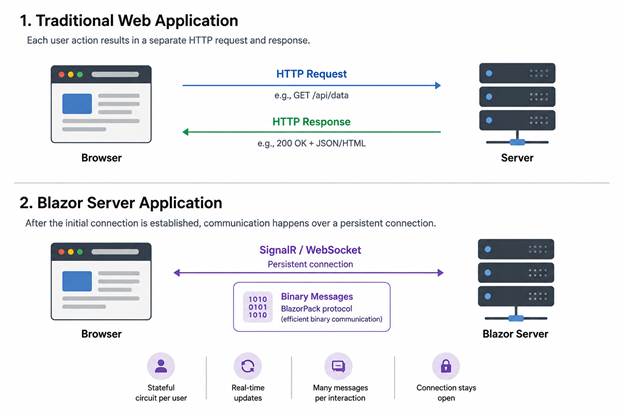
The negotiation phase provides the information required to establish the connection. Once the connection is established, communication between the browser and the Blazor Server application largely consists of binary messages using the BlazorPack protocol.
These BlazorPack messages can technically be decoded. However, decoding them and reliably reproducing meaningful user workflows at the protocol level is considerably more complex than replaying conventional HTTP requests.
The reason is that the messages are not independent requests. They are exchanged as part of a stateful Blazor Server circuit, where interactions depend on the current application and UI state, the active connection, and the sequence of previous communication between the client and server.
A single user action can also result in multiple binary messages being exchanged. Therefore, capturing a binary message and replaying it many times does not automatically represent multiple real users performing that action.
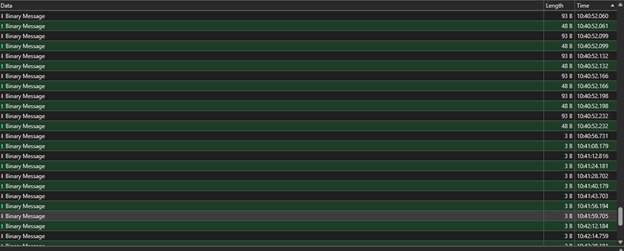
For our performance-testing goals, building and maintaining a custom mechanism for decoding, constructing and replaying BlazorPack communication would have introduced significant complexity without guaranteeing that the generated traffic accurately represented real user behavior.
This led us to an important distinction:
Generating network traffic is not the same as generating realistic application load.
A Hybrid Testing Strategy
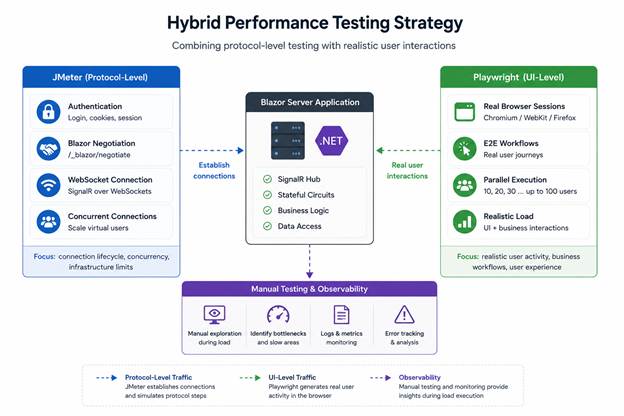
Instead of forcing a single tool to solve the entire problem, we decided to combine two approaches: JMeter for the parts of the protocol-level communication that could be reliably reproduced, and Playwright for realistic UI-level user activity.
With JMeter, we reproduced the parts of the communication flow that we could reliably control. Each virtual user could authenticate, perform the Blazor negotiation process and establish its own WebSocket connection.
This allowed us to investigate connection behavior, concurrency and infrastructure limitations.
During these tests, we encountered issues such as HTTP 429 – Too Many Requests while establishing WebSocket connections, as well as challenges around the correct ordering of the SignalR handshake and subsequent messages.
However, JMeter alone was not practical for reproducing the complete stateful business workflows occurring through Blazor’s binary communication.
That is where Playwright became the second part of our strategy.
Simulating Real Users with Playwright
We created end-to-end Playwright tests that interacted with the application through the browser just like real users would.
Instead of manually constructing or replaying BlazorPack messages, Playwright interacted with the UI while the browser, SignalR and Blazor handled the underlying communication naturally.
We then started executing these scenarios in parallel.
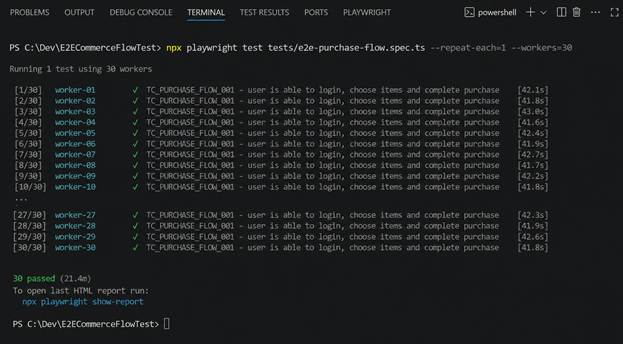
We began with approximately 10 simultaneous users, increased the load to 20 and 30, and eventually experimented with scenarios involving up to 100 concurrent browser sessions.
While the automated users were performing different workflows, we also manually navigated through the application.
This gave us another useful perspective.
The automated tests generated continuous realistic activity, while a tester could simultaneously use the application and observe questions that pure performance metrics do not always answer:
Does the application still feel responsive? Are pages loading normally? Are particular workflows becoming noticeably slower? Does one part of the application degrade before others?
In other words, we were not only measuring the system. We were actively experiencing the application while it was under load.
When the Load Generator Becomes the Bottleneck
Running dozens of real browser instances introduced another problem.
When we executed around 30 simultaneous Playwright users on a single laptop, the machine itself started becoming noticeably slower. CPU and memory consumption increased, and eventually it became difficult to distinguish whether slower test execution was caused by the application or by the machine generating the load.
This is an important distinction in performance testing: the load generator must not become the bottleneck before the system under test does.
To work around this limitation, we distributed the Playwright execution across multiple machines.
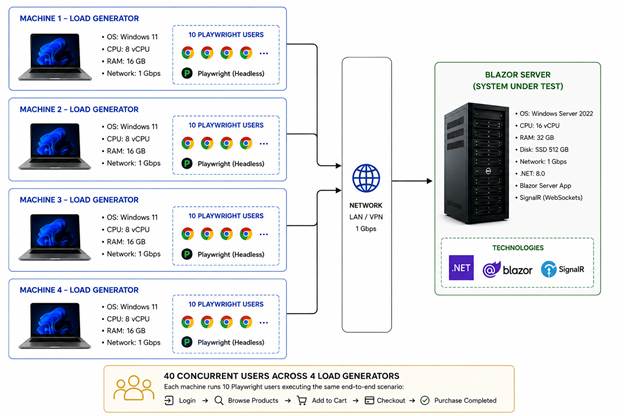
Instead of attempting to run every browser session from one laptop, several machines participated in the test simultaneously. For example, each machine could execute 10 parallel users, with all machines starting their tests at approximately the same time.
This allowed us to increase the overall number of concurrent users while reducing the resource pressure on each individual load-generating machine.
It also gave us a more reliable view of the application’s behavior because the generated load was no longer constrained by the capabilities of a single workstation.
What We Learned
The biggest lesson was that performance testing has to follow the architecture of the system being tested.
Traditional HTTP load-testing techniques are extremely effective when application behavior can be represented as a sequence of independent requests. With Blazor Server, however, persistent SignalR connections, stateful circuits and BlazorPack communication made that model significantly more complex.
Although BlazorPack can be decoded, technical possibility does not necessarily make protocol-level simulation the most practical testing strategy. For our use case, reproducing complete workflows through binary messages would have required substantially more custom implementation while introducing the risk that the generated traffic would not accurately represent real users.
We therefore stopped looking for a single tool that could do everything.
JMeter helped us test the lower-level connection lifecycle and generate controlled concurrent connections. Playwright allowed us to generate meaningful application activity through real browser sessions. Manual exploratory testing during those runs helped us understand what the user experience looked like while the system was under pressure.
Another important lesson was to always monitor the load-generating infrastructure itself. If the machine running the tests reaches its own CPU or memory limits, test results can easily be misinterpreted as application performance problems.
Finally, performance testing proved to be as much about investigation as load generation. HTTP 429 responses, WebSocket connection behavior, binary communication, browser resource consumption and application responsiveness were all pieces of the same puzzle.
FAQ
Blazor Server uses persistent SignalR connections and stateful circuits instead of relying primarily on independent HTTP requests. This makes traditional load-testing approaches more challenging, as realistic user interactions involve ongoing WebSocket communication and application state.
Yes, but with limitations. JMeter can simulate authentication, Blazor negotiation, and concurrent WebSocket connections. However, reproducing complete user workflows through BlazorPack binary messages is significantly more complex than testing conventional HTTP endpoints.
Playwright automates real browser interactions, allowing testers to simulate realistic user workflows without manually handling SignalR or BlazorPack communication. Running multiple Playwright sessions in parallel helps evaluate application responsiveness under concurrent user activity.
There is no fixed limit. The number depends on available CPU, memory, browser configuration, and test complexity. In our project, we experimented with up to 100 concurrent browser sessions, distributing execution across multiple machines to avoid overloading individual load generators.
Key challenges include managing persistent WebSocket connections, reproducing stateful user interactions, handling connection-related errors such as HTTP 429, and ensuring that load-generating machines do not become bottlenecks. Combining protocol-level testing with browser automation helps address these challenges.
Conclusion
What started as a straightforward question — “How does this application behave with more concurrent users?” — required us to understand how Blazor Server communicates beneath the UI.
The solution was not a single large stress test. It was a combination of JMeter, Playwright, distributed execution and manual observation.
By combining protocol-level testing with real browser automation, we were able to generate both connection-level load and meaningful user activity while observing how the application behaved under increasing concurrency.
The most valuable takeaway was therefore not specific to Blazor Server:
A good performance test does not simply generate as much traffic as possible. It generates the right kind of traffic, understands how the application processes that traffic, and ensures that the testing infrastructure itself does not become the bottleneck.
Now that you’re up to speed with Blazor server stress testing, learn what are the key features of Payment system testing
