
Email testing with Mailosaur
Testing emails is an essential part of quality assurance, especially for applications that rely on account verification, password resets, notifications, and multi-factor authentication. However, validating email and SMS workflows can quickly become complicated when teams rely on personal inboxes, disposable email addresses, or manual testing.
Email testing with Mailosaur provides QA teams with a more reliable way to capture, validate, and automate email and SMS communication. Mailosaur is a testing platform designed specifically for QA workflows, offering dedicated test inboxes, SMS numbers, APIs, and integrations with tools such as Postman.
In this guide, we’ll explore how Mailosaur supports email testing in QA, why it is useful for automation, and how QA teams can use it to simplify common testing scenarios such as verification emails, password resets, and one-time passwords.
The Challenges of Email Testing in QA
Testing email and SMS functionality may seem straightforward, but it often creates challenges for QA teams:
- Disposable inboxes are unreliable and can make testing inconsistent.
- Manual email testing takes time, especially when testers repeatedly create accounts or request password resets.
- Personal inboxes are difficult to share across development and QA teams.
- Automation becomes harder when test scripts cannot easily access and validate incoming messages.
These challenges become especially important when testing critical user journeys, including:
- Account registration and email verification.
- Password reset workflows.
- Multi-factor authentication (MFA).
- One-time passwords (OTP).
- Transactional notifications.
Any application that depends on external communication requires a reliable way to verify that messages are delivered correctly and contain the expected information.
What is Mailosaur?
Mailosaur solves these challenges by providing dedicated test inboxes and SMS numbers that are designed for QA and automation. Mailosaur is a platform that helps teams test email and SMS communication during software development and QA processes. Instead of using real inboxes or personal phone numbers, teams can use dedicated test environments designed specifically for automated testing.
With Mailosaur, QA teams can:
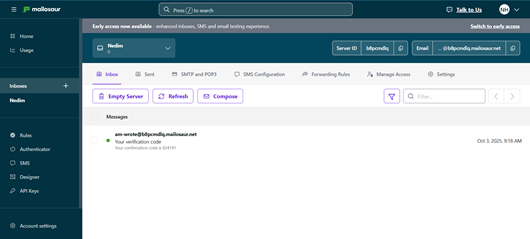
- Capture incoming emails and SMS messages.
- Validate message content automatically.
- Search and analyze messages when tests fail.
- Integrate testing workflows with APIs and automation tools.
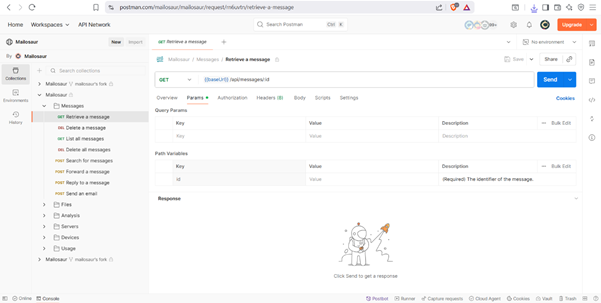
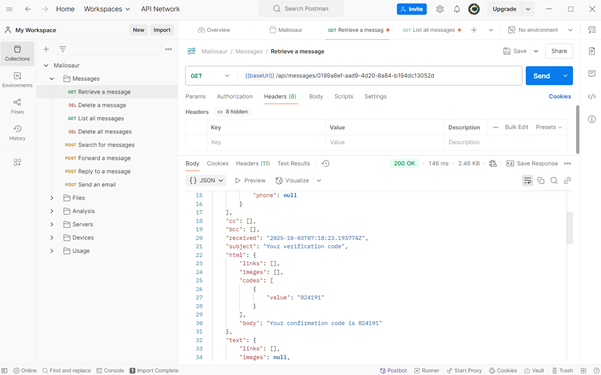
One of the most useful features is the Mailosaur Postman integration, which allows testers to quickly send API requests and retrieve messages without complex setup.
How to use Mailosaur in QA Projects
On several occasions, I’ve needed to test email verification and password reset flows. Instead of manually opening Gmail or OutA common approach to testing email workflows is connecting Postman with Mailosaur’s API to automatically retrieve and validate messages from a test inbox.
A typical workflow looks like this:
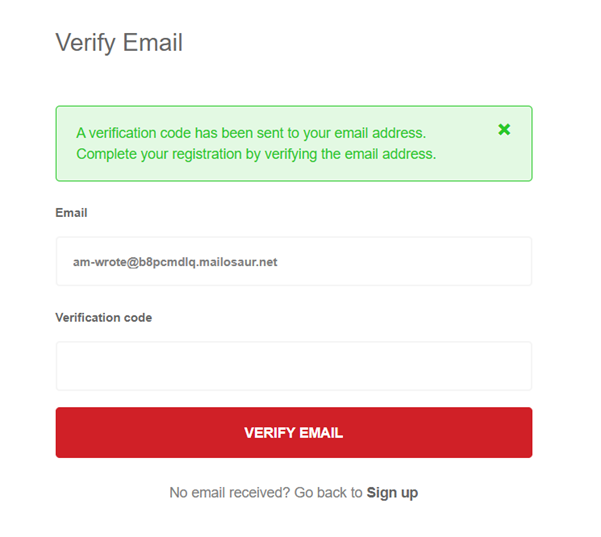
- Trigger the action: For example, register a new user in a web application and request a verification email.
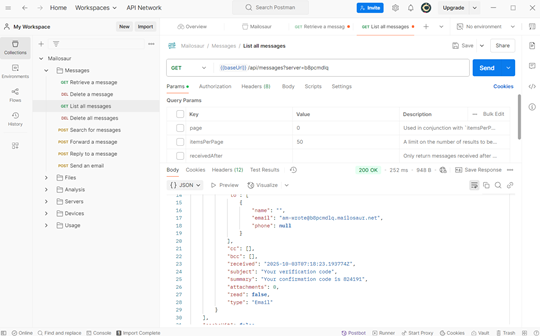
- Use Postman with Mailosaur: Send a request to Mailosaur’s API to retrieve the latest message from the test inbox.
- Parse the response: Extract important information such as verification links, OTP codes, or other required data.
- Continue the test: Use the extracted information in the next step of the automated test flow.
This approach is especially useful for end-to-end testing, as Mailosaur can be integrated into automated test scripts to verify that:
- The email or SMS message is delivered successfully.
- The sender and subject match the expected values.
- The verification link or code works correctly.
By replacing manual inbox checks with an automated validation process, Mailosaur helps make email and SMS testing more consistent, reliable, and easier to maintain.
Tips for Getting the Most Out of Mailosaur
If you’re planning to use Mailosaur in your QA workflows, here are some practical tips:
- Leverage the Postman collection first: It’s the fastest way to experiment before writing automation code.
- Use dedicated inboxes per test environment: Keeps staging and production tests clean and separate.
- Validate content, not just delivery: Don’t stop at checking if the email arrived—test that the subject, sender, and body match your requirements.
- Automate gradually: Start with Postman, then integrate into automated test suites (Selenium, Cypress, Playwright, etc.).
Conclusion
Testing email and SMS workflows does not need to be a complex or time-consuming process. With tools like Mailosaur, QA and development teams can capture, validate, and automate communication flows in a reliable and scalable way.
Mailosaur is particularly useful for testing common user journeys such as account registration, email verification, and password reset workflows, where accurate message delivery and content validation are essential.
By replacing disposable inboxes and manual checks with dedicated testing environments and API integrations, teams can create more consistent testing processes. Starting with the Mailosaur Postman collection is a simple way to explore its capabilities before integrating it into automated test workflows.